
The iPhone Hack to Hide and Lock Your Apps
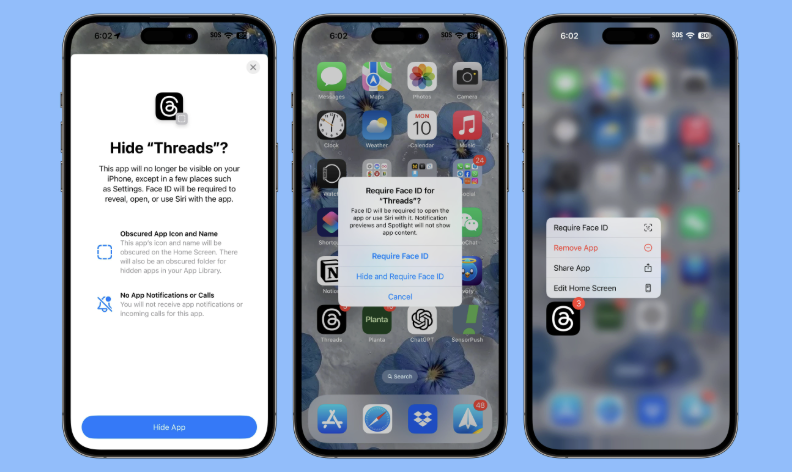
Did you know your iPhone can lock and hide apps without downloading a single thing? It's already built in, you just have to know where to look.
Here's how to actually do it.
Step 1: Lock an App with Face ID
Find the app you want to lock on your home screen. Press and hold it until the menu pops up, then tap "Require Face ID." That's it — now anyone trying to open that app needs your face (or your passcode) to get in.
This is perfect for anything you don't want someone scrolling through if they pick up your phone. Banking apps, messages, whatever you'd rather keep to yourself.
Step 2: Actually Hide the App
Want to take it further? You can hide the app completely so it's not even sitting on your home screen.
Press and hold the app again, tap "Require Face ID," and this time also tap "Hide and Require Face ID." Confirm, and the app disappears from your home screen entirely.
Where Did It Go?
It's not gone, it's just tucked away in a folder called Hidden in your App Library. To find it, swipe all the way to your App Library, scroll to the Hidden folder, and unlock it with Face ID to see everything inside.
Why This Actually Matters
Shared phones, curious kids, someone borrowing your phone to look something up real quick — this is such a simple way to keep certain apps private without downloading some sketchy third-party app that asks for way too many permissions.
Bottom Line
Two taps, zero downloads, and your apps are locked and out of sight. iOS had this the whole time.
Follow TechSesh for more iPhone hacks that make your life easier.