
Never Take Blurry Photos Again With This iPhone Hack
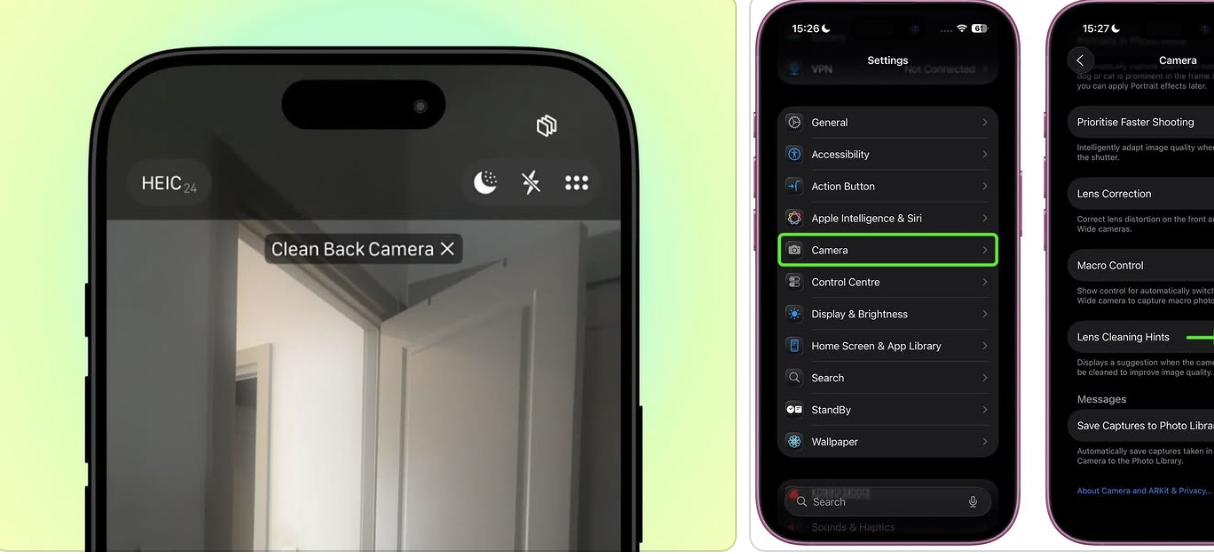
We’ve all been there … you snap what feels like the perfect photo, only to look back later and realize it’s totally blurry. Smudged lens. Missed moment. Gone forever.
But Apple quietly added a new feature that solves this exact problem, but and most people don’t even know it exists.
Introducing Lens Cleaning Hints — a new iPhone setting that literally tells you when your camera lens is dirty. So you’ll never have to guess why your photos look foggy or soft again.
Here’s how to turn it on:
Open Settings
Scroll down and tap Camera
Scroll again until you see Lens Cleaning Hints
Toggle it on ✅
That’s it. Now your iPhone will automatically alert you when it detects a dirty lens — whether you’re using the front or rear camera.
It’s such a small tweak, but it makes a huge difference. So before your next photo session, do this one thing — and say goodbye to blurry shots for good.
Follow @jessicanaziri for more.